Loading...
What is MCP?
The Model Context Protocol (MCP) is an open standard that lets AI assistants use external tools. Instead of copy-pasting data into a chat, your AI can call ABTestResult's statistical tools directly and give you instant, accurate analysis.
Ask in Natural Language
“Is my test significant?” — your AI calls the right tool with the right parameters.
Runs Locally
All calculations run on your machine. No data leaves your computer. No API keys needed.
Same Calculations
Identical statistical methods to our web calculators. Trusted by thousands of experimenters.
What You Can Do
Just describe what you need — your AI handles the rest.
Analyze Test Results
Get instant significance testing with p-values, confidence intervals, and lift calculations.
“My A/B test had 5,000 users per group. Control converted at 5%, variant at 6%. Is it significant?”
Plan Sample Sizes
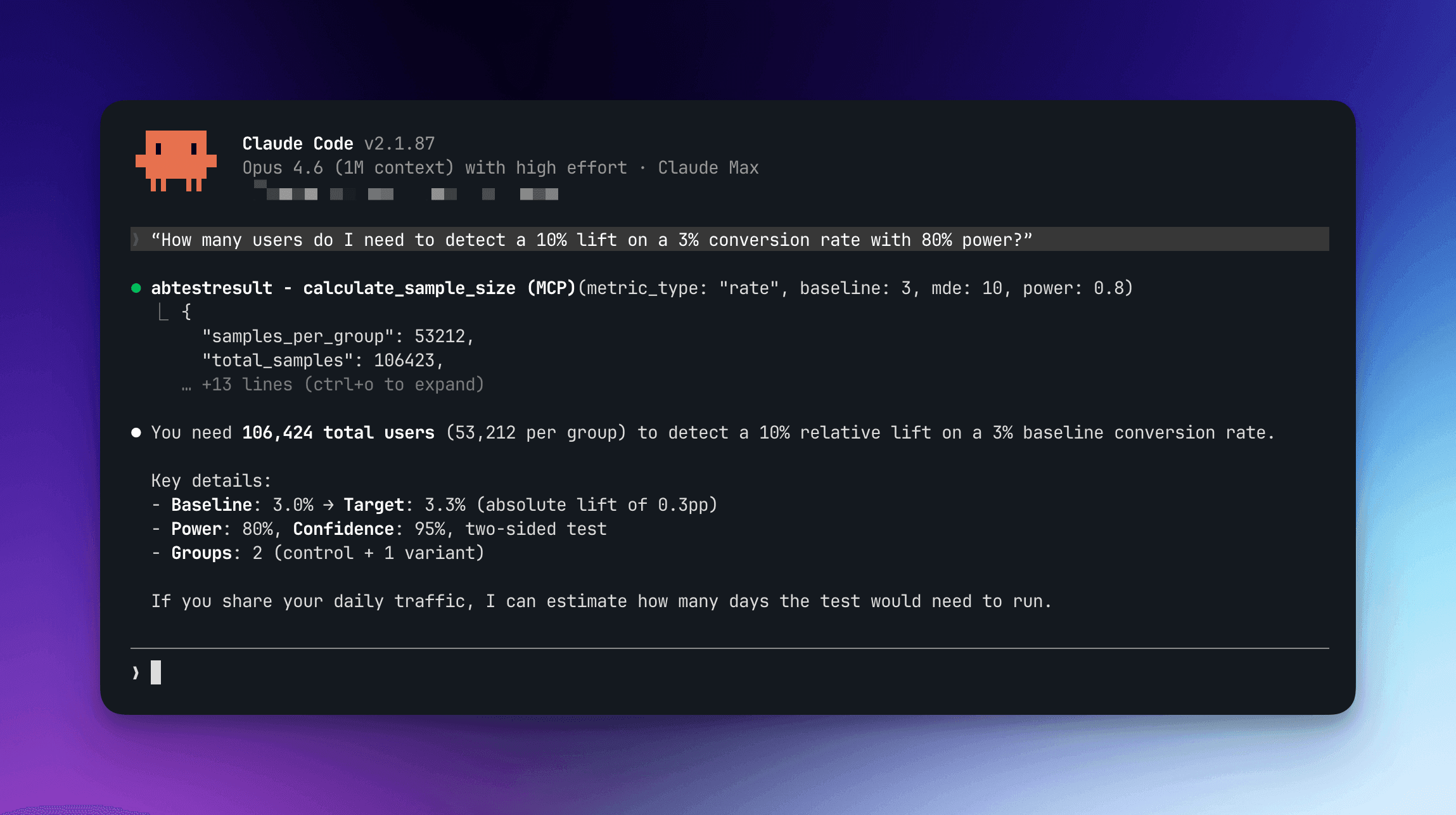
Calculate how many users you need before launching a test.
“How many users do I need to detect a 10% lift on a 3% conversion rate with 80% power?”
Bayesian Analysis
Get probability to be best, expected loss, and credible intervals.
“Run a Bayesian analysis: control 10K users / 500 conversions, variant 10K / 580 conversions”
Sensitivity Analysis
Find the smallest effect you can detect with your available traffic.
“What's the smallest effect I can detect with 50,000 total users and a 5% baseline?”
Data Quality Checks
Detect Sample Ratio Mismatch before it invalidates your results.
“Check if my traffic split is valid: control 10,234 users, variant 9,766 users”
Paired Experiments
Analyze before/after or matched-pair data with automatic test selection.
“Run a paired test on these before [10, 12, 8, 15] and after [12, 14, 9, 18] measurements”
Setup
Add ABTestResult to your AI assistant in under a minute.
1
Add to your MCP config~/Library/Application Support/Claude/claude_desktop_config.json
{ "mcpServers": { "abtestresult": { "command": "npx", "args": ["-y", "abtestresult-mcp"] } }}2
Ask your AI assistantThat's it. No API keys, no authentication, no server to run. The MCP server starts automatically when your AI needs it. Just ask a question:
The npm package ships readable source and is licensed for local personal, non-commercial use. Commercial use requires a separate license.
AI Assistant
>
My test ran for 2 weeks. Control: 12,000 visitors with 480 conversions. Variant: 12,000 visitors with 552 conversions. Is this significant?
<
Significant — variant outperforms control (p=0.0023, +15% lift, CI: [0.5%, 2.2%])
Available Tools
8 statistical tools your AI assistant can call. Same calculations as our web tools.
analyze_ab_testAnalyze an A/B test with rate/proportion metrics (conversion rate, CTR). Uses a Z-test for proportions.
Parameters
control_users(number)— Users in control groupcontrol_conversions(number)— Conversions in controlvariant_users(number)— Users in variant groupvariant_conversions(number)— Conversions in variantconfidence_level(number, optional)— Default: 0.95test_type(string, optional)— "two-sided" or "one-sided". Default: "two-sided"non_inferiority_margin(number, optional)— Relative margin as % of the control rate (2 = up to 2% of baseline worse, not 2 points). Runs a one-sided non-inferiority testexpected_control_share(number, optional)— Planned control share for unequal splits (e.g. 0.05). Adds an SRM check against it// Your AI will return something like:{ "significant": true, "p_value": 0.028295, "p_value_display": "0.0283", "control_rate": "5%", "variant_rate": "6%", "relative_lift": "20%", "confidence_interval_diff": { "lower": "0.11%", "upper": "1.89%" }}analyze_ab_test_averageAnalyze an A/B test with continuous metrics (revenue per user, time on page). Uses Welch's T-test (unequal variances), so it stays accurate with unequal splits.
Parameters
control_users(number)— Users in control (at least 2)control_mean(number)— Mean value for controlcontrol_std_dev(number)— Standard deviation for controlvariant_users(number)— Users in variant (at least 2)variant_mean(number)— Mean value for variantvariant_std_dev(number)— Standard deviation for variantconfidence_level(number, optional)— Default: 0.95expected_control_share(number, optional)— Planned control share for unequal splits (e.g. 0.05). Adds an SRM check against it// Your AI will return something like:{ "significant": true, "p_value": 3.96e-10, "p_value_display": "≈ 0", "t_score": 6.2872, "degrees_of_freedom": 1993.62, "control_mean": 45.2, "variant_mean": 48.8, "absolute_lift": 3.6, "relative_lift": "7.96%", "confidence_interval_diff": { "lower": 2.4771, "upper": 4.7229 }}calculate_sample_sizeCalculate the required sample size for an A/B test. Supports rate and average metrics with Sidak correction.
Parameters
metric_type(string)— "rate" or "average"baseline(number)— Baseline value (e.g. 5 for 5% conversion rate)mde(number)— Min detectable effect as relative % (e.g. 10 for 10%)confidence_level(number, optional)— Default: 0.95power(number, optional)— Default: 0.80daily_traffic(number, optional)— To estimate duration in dayscontrol_share(number, optional)— Control share for unequal splits (e.g. 0.05 for a 5% holdout)// Your AI will return something like:{ "samples_per_group": 14748, "total_samples": 29496, "estimated_days": 6, "effect_size": 0.0165, "absolute_mde": 0.005}calculate_mdeCalculate the minimum detectable effect given a fixed sample size. Answers: 'What's the smallest lift I can detect?'
Parameters
total_traffic(number)— Total traffic across all groupsbaseline(number)— Baseline rate (%) or meanmetric_type(string, optional)— Default: "rate"confidence_level(number, optional)— Default: 0.95power(number, optional)— Default: 0.80control_share(number, optional)— Control share for unequal splits (e.g. 0.05 for a 5% holdout)// Your AI will return something like:{ "mde_absolute": 0.004123, "mde_relative_percent": "8.25%", "interpretation": "You can detect an absolute change of 0.41% (8.25% relative lift) from the 5% baseline."}bayesian_ab_testBayesian A/B test analysis. Returns probability to be best, expected loss, and credible intervals. Supports multiple variants.
Parameters
metric_type(string)— "rate" or "average"variants(array)— Array of {name, users, conversions} or {name, users, mean, std_dev}simulations(number, optional)— Monte Carlo samples. Default: 100,000credibility(number, optional)— Credible interval level. Default: 0.95// Your AI will return something like:{ "summary": "⏳ No clear winner yet. The leading variant (Copy A) has only 65.79% probability of being best. Expected loss if you ship Copy A: ≈ 0.07 percentage points (≈ 1.4% of the control rate).", "variants": [ { "name": "Control", "probability_to_be_best": "3.77%", "expected_loss": 0.005206, "expected_loss_display": "≈ 0.521 percentage points (≈ 10.39% of the control rate)" }, { "name": "Copy A", "probability_to_be_best": "65.79%", "expected_loss": 0.0007, "expected_loss_display": "≈ 0.07 percentage points (≈ 1.4% of the control rate)" }, { "name": "Copy B", "probability_to_be_best": "30.44%", "expected_loss": 0.002207, "expected_loss_display": "≈ 0.221 percentage points (≈ 4.41% of the control rate)" } ], "lift_vs_control": [ { "variant": "Copy A", "vs": "Control", "absolute_lift": { "mean": "+0.451 pp" }, "relative_lift": { "mean": "9.2%" } }, { "variant": "Copy B", "vs": "Control", "absolute_lift": { "mean": "+0.3 pp" }, "relative_lift": { "mean": "6.19%" } } ]}check_srmCheck for Sample Ratio Mismatch — detects bugs in experiment traffic splitting.
Parameters
control_users(number)— Users in controlvariant_users(number)— Users in variantexpected_control_share(number, optional)— Planned control share. Default: 0.5 (50/50)// Your AI will return something like:{ "has_mismatch": true, "p_value": 3.56e-7, "p_value_display": "≈ 0", "summary": "SRM DETECTED (p ≈ 0) — The traffic split is 51.8%/48.2% instead of 50/50. DO NOT trust the results."}paired_testBefore/after paired analysis. Auto-selects Paired T-Test or Wilcoxon Signed-Rank based on data normality.
Parameters
sample_before(number[])— Measurements before treatmentsample_after(number[])— Measurements after treatment (same length)confidence_level(number, optional)— Default: 0.95// Your AI will return something like:{ "test_used": "Paired T-Test", "significant": true, "p_value": 0.003, "mean_before": 11.2, "mean_after": 13.4, "mean_difference": 2.2, "relative_difference": "19.6%"}survey_sample_sizeCalculate required sample size for surveys using Cochran's formula with finite population correction.
Parameters
population(number)— Total population sizemargin_of_error(number)— Margin of error as % (e.g. 5 for ±5%)confidence_level(number, optional)— Default: 0.95expected_response_rate(number, optional)— Expected response rate as % (e.g. 20). Returns how many people to invite// Your AI will return something like:{ "required_sample_size": 370, "population": 10000, "margin_of_error": "±5%", "share_of_population_needed": "3.7%", "expected_response_rate": "20%", "invitations_needed": 1850}Usage & Limits
Rate Limits
- 60 calls per minute per session — more than enough for interactive use
- 1,000 calls per hour — prevents runaway loops
- Limits reset automatically — no lockouts
Free for Personal Use
- Free for individual and internal use
- No API key required — runs locally on your machine
- Privacy-first — no data sent to any server
Supported Calculations
The same statistical methods available in our web tools.
Frequentist A/B testing (Z-test)
Continuous metrics (T-test)
Bayesian inference
Sample size calculation
MDE estimation
SRM detection
Paired tests
Survey sample sizing
Confidence intervals
Sidak correction
Multiple variants support
Non-inferiority testing
Prefer a Web Interface?
Use these calculators directly in your browser — no setup required.